
- All
- Product Name
- Product Keyword
- Product Model
- Product Summary
- Product Description
- Multi Field Search
Views: 0 Author: Site Editor Publish Time: 2026-10-26 Origin: Site


Leaving a hot appliance unattended creates a severe safety hazard. Conversely, an iron powering down mid-task causes operational frustration. Not all modern irons include automatic shut-off capabilities. Among those that do, the underlying trigger mechanisms dictate whether the feature acts as a lifesaving safety net or a workflow bottleneck. Selecting the right steam iron auto shut-off requires understanding internal circuitry, evaluating time-to-off standards, and matching the safety mechanism to specific use cases. Standard garment care demands different safety parameters than continuous sewing or quilting. Recognizing how this safety upgrade functions helps you make informed decisions without compromising efficiency. We will examine the mechanics, compliance standards, and troubleshooting steps necessary to keep your equipment running safely. You need to know exactly what happens inside the casing when the appliance sits idle on the board.
Mechanism Variance: Auto shut-off relies on a combination of motion sensors, capacitive handle switches, and thermal fuses, not just a simple timer. Advanced models use multi-switch redundancy for fail-safe accuracy.
Position-Dependent Timers: Industry safety standards (often marketed as "3-way auto-stop") typically dictate a 30-second shut-off when horizontal or tipped, and an 8-to-15 minute shut-off when resting upright.
Use-Case Trade-Offs: The same feature that protects a distracted user (e.g., those with ADHD or appliance anxiety) can actively hinder crafters and sewists who require constant, immediate heat between fabric adjustments.
System-Wide Integration: Quality auto shut-off systems don't just cut the heat; they also disable the electronic steam pump to prevent water leakage as the soleplate cools.
Troubleshooting Indicators: A blinking indicator light usually signals standby mode, but persistent blinking alongside a failure to heat indicates a tripped internal relay or sensor failure.
Users frequently misunderstand what triggers the shut-off sequence. This knowledge gap leads to perceived malfunctions when the iron functions exactly as designed. Understanding the internal hardware clarifies why an iron behaves a certain way on the board. We need to look at the specific components mounted on the printed circuit board inside the handle.
The core of most shut-off systems relies on physical movement. Manufacturers install internal ball-bearing tilt switches or basic accelerometers directly on the control board. Inside a small plastic or glass housing, a metal ball rests across electrical contacts. Physical movement causes the ball to roll, breaking and remaking the circuit. This physical action continuously resets the internal electronic timer.
The primary limitation involves micro-movements. Subtle shifts on a resting board often fail to register on the iron motion sensor safety feature. This causes premature shut-off during delicate pressing tasks. If you are working on a small collar and barely moving the appliance, the ball bearing might not shift enough to reset the timer. The control board assumes the unit is abandoned and cuts the power.
Advanced designs utilize capacitive handle switches to detect user grip. The circuitry measures changes in the local electric field caused by human skin capacitance. Grasping the handle closes the circuit instantly. This provides instant-on heating the moment you touch the handle, bypassing the need for aggressive shaking.
Premium models combine handle sensors with motion sensors. This multi-switch redundancy creates a fail-safe system. If the motion sensor fails to detect a micro-movement, the capacitive sensor still registers your hand. This drastically reduces false shut-offs during complex ironing sessions. You get continuous heat as long as you hold the appliance.
Quality shut-off circuits communicate directly with the internal water pump. Cutting power to the heating element is only half the safety equation. The system must also disable the solenoid valve controlling water flow.
Cutting power to the pump prevents the iron from spitting or leaking water once the soleplate temperature drops below steam-generating thresholds. Without this integration, residual water drips through the cold soleplate. This ruins fabrics and creates slip hazards on the floor. When the control board triggers the standby mode, it simultaneously sends a signal to close the water valve.
User-inactivity shut-off relies on timers and motion sensors. Thermal shut-off relies entirely on temperature. Bi-metallic thermostats manage standard temperature regulation. They bend as they heat to open and close the circuit, maintaining the target temperature.
If this primary thermostat fails, the iron overheating protection engages. A thermal fuse physically breaks the electrical circuit if the soleplate exceeds maximum safe operating temperatures. This is a permanent, non-resettable safety measure designed to prevent catastrophic fires. Once a thermal fuse blows, the circuit remains open forever. You cannot reset it by unplugging the unit.
Verifying your equipment functions correctly requires a controlled test. Never assume a new appliance works perfectly out of the box. Set up your ironing board in a clear area away from flammable materials. Plug the unit in and set it to the highest cotton setting. Place it upright on its heel rest and start a stopwatch. Do not touch the board or the handle. Monitor the LED indicator.
Exactly at the 8, 10, or 15-minute mark specified in your manual, the light should begin blinking. You should hear a distinct click from the internal relay. Carefully wave your hand near the soleplate without touching it to confirm the heat is dissipating. Next, test the horizontal sensor. Place the cold appliance face-down on a silicone resting pad. Turn the power back on and wait 30 seconds. The rapid-response timer must engage immediately. If the unit fails either test, return it to the manufacturer. Operating an appliance with a defective safety timer exposes your home to severe risks.
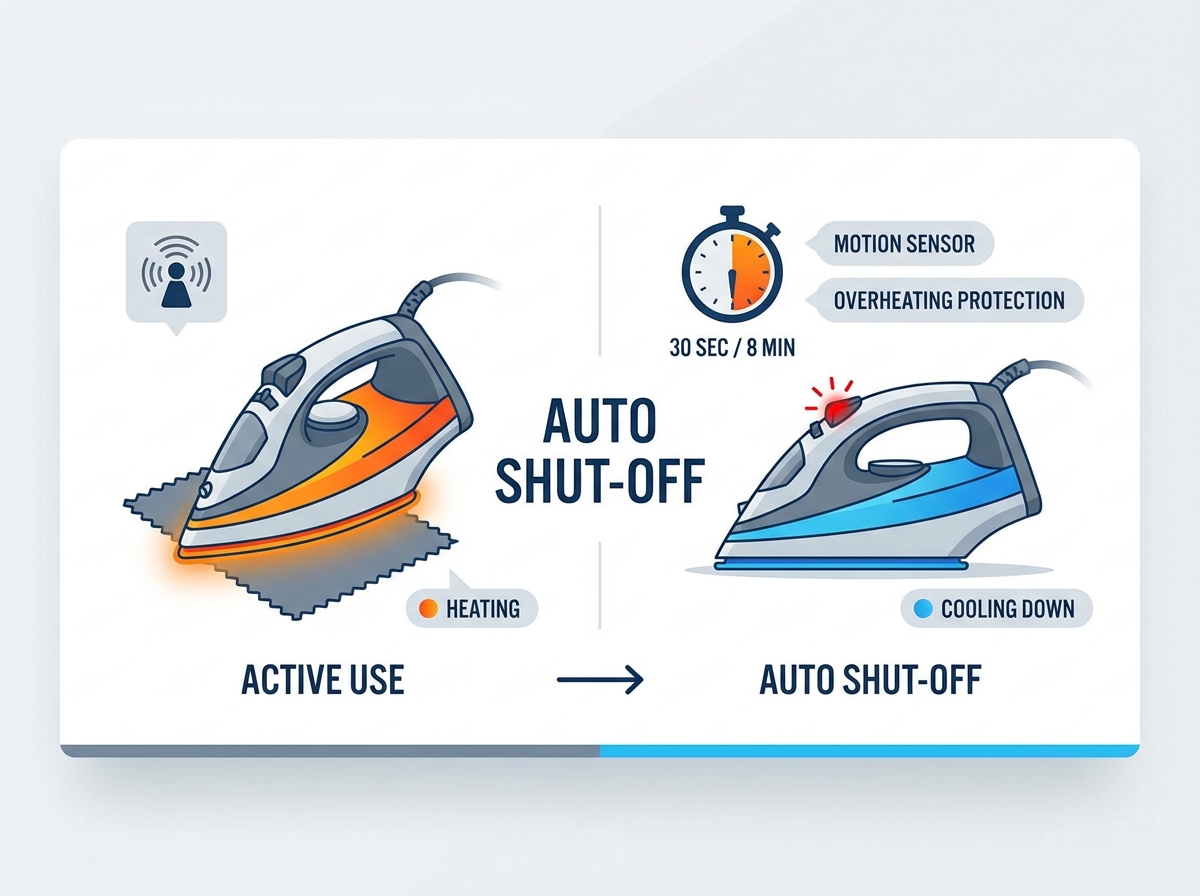
Manufacturers calibrate timers based on the physical orientation of the appliance. Different positions present different immediate fire risks. Safety testing laboratories mandate specific response times to mitigate these distinct hazards. Understanding these standards helps you anticipate how the equipment will react during use.
Brands frequently market their safety systems as "3-way auto-stop" or "3-way protection." This terminology covers the three primary physical states the equipment can occupy: horizontal, upright, and tipped over. The internal tilt switch identifies the orientation and routes the signal to the appropriate timer circuit.
Iron Orientation | Standard Shut-Off Time | Primary Risk Mitigated | Internal Sensor State |
|---|---|---|---|
Horizontal (Face-down) | 30 Seconds | Immediate fabric ignition and board fires | Tilt switch level, timer accelerated |
Tipped Over (Side) | 30 Seconds | Surface burns and localized fire hazards | Tilt switch engaged laterally |
Upright (Heel rest) | 8 to 15 Minutes | Ambient heat damage and energy waste | Tilt switch vertical, timer extended |
A rapid-response requirement activates when the soleplate rests face-down on the ironing board or tips onto its side. Testing standards dictate a strict 30-second timeline. Leaving a 1500W heating element pressed against cotton or synthetic fibers causes irreversible scorching within seconds.
Cutting power at the 30-second mark prevents the material from reaching its auto-ignition temperature. Synthetic fabrics melt rapidly, adhering to the soleplate and creating toxic fumes. Natural fibers like cotton or linen will smolder and eventually ignite. The 30-second horizontal rule acts as the primary defense against active fires.
Upright standby times vary significantly across different brands. An upright iron poses a lower immediate fire risk because the soleplate faces the open air. However, it still requires a hard stop. Prolonged ambient heat damages nearby objects, wastes energy, and degrades internal electronic components.
The 8-to-15 minute window provides enough time to adjust garments while ensuring the appliance eventually powers down. Engineers calculate this window based on average user behavior. Most people take between two and five minutes to pin a seam or fold a large sheet. An 8-minute timer accommodates these tasks without leaving the heating element active indefinitely.
Matching the internal logic of the appliance to your operational reality prevents daily frustration. Different households and professions require vastly different safety parameters. You must evaluate your specific needs before selecting a model.
Aggressive motion-sensor models serve users prioritizing household safety. Managing high-distraction environments requires non-negotiable safety nets. An 8-minute upright shut-off provides immense psychological relief. Users can trust their electronics to prevent disasters if they walk away to answer a phone or tend to a child.
Investing in a reliable automatic shut off steam iron delivers peace of mind for everyday laundry tasks. You do not have to second-guess whether you unplugged the appliance before leaving the house. The internal relay guarantees the heating element is cold.
Quilters and tailors face specific frustrations with standard safety timers. Complex projects require spending ten or more minutes pinning fabric while the appliance sits upright. A standard model powers down repeatedly, breaking workflow.
Crafters often evaluate the trade-offs of purchasing bypass models or commercial-grade irons. These specialized tools intentionally omit the auto shut-off feature to provide constant, uninterrupted heat. If you sew daily, a standard 8-minute timer will severely impact your productivity. You will spend hours waiting for the soleplate to reheat.
Upgrading to a reliable steam iron safety shut off requires only a minimal premium over base models. This makes it a critical investment for household safety. The minor upfront expense heavily outweighs the potential property damage caused by an unattended heating element.
When evaluating options, consider the long-term value of the internal components. Cheaper models use mechanical relays that wear out after a few years. Premium models use solid-state relays that handle thousands of switching cycles without degrading.
Recovery time defines the seconds required for the appliance to return to maximum steam temperature after waking from standby mode. High-wattage irons minimize workflow disruption. A 1500W or 1800W heating element pushes the soleplate back to operational temperatures in seconds.
Low-wattage models struggle to recover quickly. They turn a minor safety feature into a major operational bottleneck. If your appliance takes two minutes to reheat after every standby cycle, your total ironing time increases drastically. Always check the wattage rating before purchasing.
Different fabrics react differently to residual heat during a standby cycle. Understanding this interaction helps you manage your workflow. Synthetic materials like polyester, nylon, and acrylic have low melting points. If the appliance enters standby mode while resting near these fabrics, the ambient heat radiating from the soleplate can still cause warping or glazing. Always move the unit to a safe resting pad when working with synthetics.
Natural fibers like heavy cotton, denim, and linen require maximum heat and heavy steam penetration. If the timer engages while you are pinning a denim seam, the soleplate will lose its peak temperature. When you wake the unit, you must wait for the full recovery cycle before pressing. Attempting to iron heavy cotton with a recovering soleplate results in weak creases and water spotting from the steam vents.
Misinterpreting safety alerts leads to unnecessary appliance replacement or dangerous bypass attempts. Understanding the diagnostic indicators keeps the appliance running safely. You need to know the difference between a normal standby state and a hardware failure.
A slow, rhythmic blinking light serves as the universal industry standard for an active auto shut-off state. It confirms the circuit has cut power to the heating element. The standard wake-up procedure requires a gentle horizontal shake to trigger the motion sensor or a firm grip on the handle to trigger the capacitive switch.
Once you wake the appliance, the light usually turns solid red or green, indicating the heating element is active. You will hear a faint click from the handle as the internal relay closes and restores power to the soleplate.
Internal components occasionally fail. Drops impact the ball-bearing switch, or calcification affects internal relays. When the motion sensor gets stuck, the appliance enters a permanent standby state. If you notice a steam iron auto off light blinking constantly despite movement, run a diagnostic check.
Follow these steps to reset a stuck relay:
Unplug the unit directly from the wall outlet.
Empty the water reservoir completely to prevent internal shorts.
Allow the soleplate to cool to room temperature.
Gently tap the base of the handle against your palm to dislodge a stuck ball bearing.
Plug the unit into a different, known-working outlet to bypass potential breaker issues.
If you suspect a blown thermal fuse, you can confirm the diagnosis with a standard digital multimeter. Unplug the appliance and allow it to cool completely. Remove the rear cover plate on the handle to expose the main terminal block. Set your multimeter to the continuity setting, usually indicated by a sound wave icon.
Place the probes across the two terminals leading to the heating element. A continuous beep indicates the circuit is closed and the thermal fuse is intact. In this case, the blinking light likely points to a failed control board or a stuck motion sensor. If the multimeter remains silent and displays "OL" (open loop), the thermal fuse has blown. The circuit is permanently broken. This confirms the appliance experienced a critical overheating event and successfully killed the power to prevent a fire. You must discard the unit.
A blinking light accompanied by a permanently cold soleplate often indicates a blown thermal fuse rather than a simple tripped breaker. Consumer irons use thermal fuses as a fatal, non-repairable error state. Once the fuse blows to prevent a fire, the circuit remains permanently open.
Attempting to bypass a blown thermal fuse creates a severe fire hazard. Replacement is mandatory. Do not open the casing to splice the wires together. The thermal fuse blew because the primary thermostat failed. Bypassing the fuse guarantees the soleplate will heat until it melts the plastic housing or starts a fire.
Specific features separate a premium safety implementation from a cheap, frustrating one. Review these specifications before finalizing a purchase. You want a system that protects your home without interfering with your work.
Visual alerts rely on silent blinking lights, requiring you to look at the appliance. Auditory alerts provide a pre-shut-off warning beep. This beep allows you to shake the handle before the temperature drops, maintaining heat without breaking concentration.
Auditory warnings drastically improve the user experience during long ironing sessions. If you are focused on a complex seam, you will not notice a blinking LED. A sharp beep gives you a five-second warning to reset the timer.
Certain models offer a physical switch to toggle the auto shut-off feature on and off. This bypass capability remains rare due to liability concerns but is highly sought after by crafters. It provides the flexibility of continuous heat for sewing projects and standard safety for everyday laundry.
If you purchase a bypass model, you must establish strict operational habits. Always unplug the unit immediately after use. Never rely on the bypass switch as a substitute for proper power management.
Thicker, heavier soleplates retain heat longer during a shut-off cycle. Ceramic or thick stainless steel soleplates smooth the transition when the appliance wakes back up. The residual heat allows you to continue pressing minor wrinkles while the element returns to maximum temperature.
Soleplate Material | Heat Retention Capacity | Recovery Speed Impact |
|---|---|---|
Thin Aluminum | Low - Loses heat rapidly in standby | Requires full reheating cycle |
Stainless Steel | Medium - Holds heat for 1-2 minutes | Moderate recovery time |
Thick Ceramic | High - Retains pressing heat for 3+ minutes | Minimal workflow disruption |
An auto shut-off remains a non-negotiable feature for general household use. The specific trigger mechanism dictates the daily user experience. Standard users should prioritize fast-recovery, motion-sensing models equipped with auditory alerts. Sewists and tailors must look for extended 15-minute upright timers or specific bypass functionalities to maintain workflow efficiency.
Take the following steps before making your final selection:
Check the wattage on the manufacturer's spec sheet to ensure fast recovery times after standby mode.
Verify the specific upright timer duration matches your typical ironing workflow and project needs.
Confirm pump-integration details to prevent water leakage when the soleplate cools down.
Inspect the handle for capacitive sensors if you prefer touch-activation over physical shaking.
A: No. While common in consumer models, many professional, hotel-grade, and sewing-specific irons intentionally omit it. Always verify the spec sheet before purchasing.
A: Depending on the model, it requires either a gentle horizontal shake to trigger the internal motion sensor or gripping the handle to trigger a capacitive switch.
A: This usually indicates a blown thermal fuse or a permanently stuck internal relay. The iron has entered a permanent fail-safe mode to prevent a fire and requires replacement.
A: High-quality models integrate the shut-off with the electronic steam pump, disabling water flow when the heat turns off. Cheaper models may leak if left face-down during standby.
A: On the vast majority of consumer irons, this feature is hardwired into the circuitry for liability reasons. It cannot be disabled without dangerous modifications.
A: Auto shut-off is triggered by a lack of physical movement over a specific time. Thermal protection is triggered by the internal temperature exceeding safe limits, regardless of movement.
A: Industry standards dictate approximately 30 seconds if left face-down or tipped over, and between 8 to 15 minutes if left resting upright on its heel.


